Interview Problem Explained: Search in a Binary Search Tree (BST)
Learn how to solve Leetcode 700, “Search in a Binary Search Tree,” with clear visuals and code walkthroughs. Master BST logic, tree traversal, and coding interview strategies.
What You’ll Learn from This Interview Prep Article
Level: Intermediate | Reading Time: 15–20 mins
Key Topic: Tree, Binary Tree, Binary Search Tree (BST)
1. Understanding the structure and concept of Tree and Binary Tree
2. How to implement a Binary Tree using classes
3. The difference between Preorder, Inorder, and Postorder Traversals with code
4. Grasping the concept and search logic of Binary Search Trees
5. Improving problem-solving skills for tree-based coding interview problems
Binary Search Tree: Problem Statement
You are tasked with efficiently searching for a specific value in a data structure shaped as a Binary Tree. This tree is not just any binary tree, but a Binary Search Tree (BST) that follows specific rules.
To understand and solve problems involving BSTs, you must first clearly grasp the Tree data structure and the concept of searching within it. Based on this, you can learn the properties and applications of BSTs to approach problem-solving effectively.
Binary Search Tree properties:
Every node can have at most two child nodes (left, right).
All nodes in the left subtree must have values less than the current node.
All nodes in the right subtree must have values greater than the current node.
These conditions are recursively applied to every node in the tree.
A tree that satisfies these conditions is like a hierarchical representation of sorted data, allowing you to perform search, insert, and delete operations quickly by halving the search range at each step.
Step 1. What is a Tree?
Idea
A Tree is a representative data structure in computer science for expressing hierarchical structures. It starts from a root node and branches out to multiple child nodes.
While real trees grow upwards from the roots, the tree data structure is represented upside down. The root is at the top, and branches split downward, which is why it’s called a “Tree.” Trees are composed of parent-child relationships between nodes and are a type of directed graph. However, they are distinguished from general graphs by their top-down directionality and the absence of cycles.
A tree is made up of nodes connected by edges, with each node forming part of a levelled structure where direction and hierarchy matter.
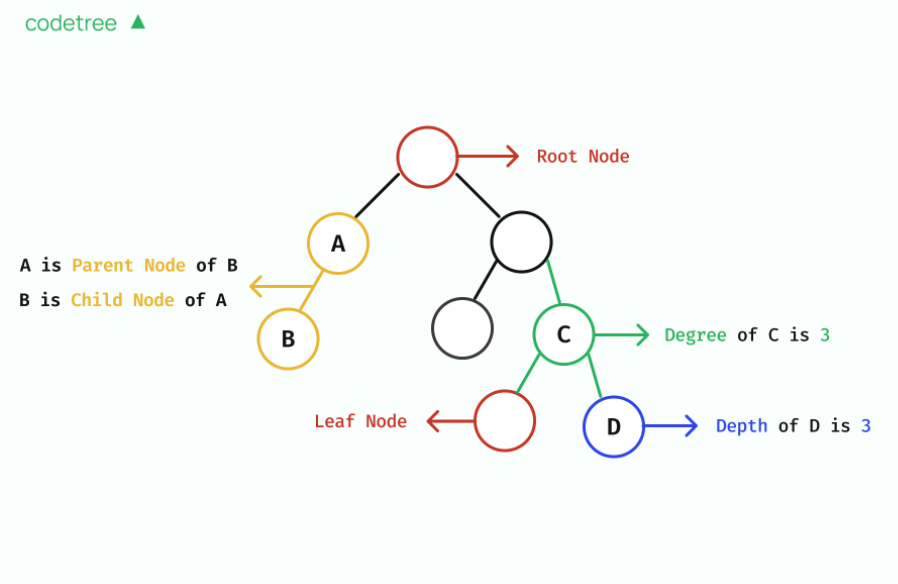
Key Terms for Understanding Trees
Term | Description |
|---|---|
Node | Each point in the tree, also called a “vertex.” |
Edge | The line connecting nodes. In trees, edges are directed from top to bottom. |
Root Node | The topmost node where the tree starts. It has no parent. |
Parent / Child | In a connected pair, the upper node is the parent, the lower is the child. |
Degree | The number of child nodes a node has. |
Depth | The distance from the root node. The root’s depth is 0. |
Height | The maximum depth of the tree plus one. |
Leaf Node | A node with no children, located at the end of the tree. |
2. What is a Binary Tree?
A Binary Tree is the most basic form of a tree structure, where each node can have at most two child nodes. These two children are clearly distinguished as the left child and right child, and each may be absent or present.
The important point is that no node can have more than two children. Binary Trees are the foundation for advanced data structures like Binary Search Trees (BSTs) and Heaps, so understanding their structure is crucial.
Step 3. Expressing a Binary Tree as a Class
Idea
As explained, a tree is a data structure that expresses hierarchical relationships between nodes. To implement this in code, you define the basic unit, the node, and design how each node connects to its children.
The most common approach is to:
Define a class called
NodeUse instances of this class to build the tree
Each node will store data and point to its left and right children (if they exist)
Key Design Ideas:
Node Class:
Each node stores data and has attributes pointing to its left and right children.
If a child is absent, the attribute is initialized as None.
Building the Tree:
Start with the root node and expand the tree step by step.
When creating a new node, instantiate a Node and connect it to the existing structure.
Here’s a simple Python implementation of a binary tree node class and an example tree:
# Define a class for a binary tree node
class Node:
    def __init__(self, data):
        self.data = data      # Value stored in the node
        self.left = None      # Reference to left child (initially None)
        self.right = None     # Reference to right child (initially None)

# Build a binary tree using the Node class
root = Node('A')
root.left = Node('B')    # B as left child of A
root.right = Node('C')   # C as right child of A

# Expand the tree
root.left.left = Node('D')    # D as left child of B
root.left.right = Node('E')   # E as right child of B
root.right.right = Node('F')  # F as right child of C

# Tree structure:
#        A
#       / \
#      B   C
#     / \   \
#    D   E   F
In this code, the Node class defines the structure of each tree node. Starting from the root, you connect nodes using dot notation (root.left, etc.) to build the tree. The example tree is visualized in the comments: A is the root, B and C are its children, D and E are under B, and F is under C. Each node can have up to two children, and if absent, the pointer is set to None.
Logic Breakdown
Each Node object has three attributes:
data: The value stored in the node (e.g., 'A', 'B', 'C', etc.)
left: Reference to the left child (None if absent)
right: Reference to the right child (None if absent)
The tree usually starts from a root variable, and new nodes are connected to the left or right as appropriate.
Step 4. Traversing a Binary Tree
In tree structures, it’s important to define the order in which all nodes are visited. This process is called tree traversal, and in binary trees, the following three DFS-based methods are commonly used.
1. Preorder Traversal
Visit order: Root → Left → Right
Visit the current node first, then recursively visit the left and right children.
2. Inorder Traversal
Visit order: Left → Root → Right
Visit all nodes in the left subtree, then the current node, then the right subtree.
In Binary Search Trees (BSTs), inorder traversal outputs values in sorted order.
3. Postorder Traversal
Visit order: Left → Right → Root
Visit all children first, then the parent node.
Let’s look at Python implementations for each method, using the example tree from Step 3. Each function prints the value when visiting a node.
# Preorder Traversal: Root -> Left -> Right
def preorder(node):
    if node is None:
        return
    print(node.data, end=' ')
    preorder(node.left)
    preorder(node.right)

print("Preorder Traversal Result:")
preorder(root)
# Output: A B D E C F

# Inorder Traversal: Left -> Root -> Right
def inorder(node):
    if node is None:
        return
    inorder(node.left)
    print(node.data, end=' ')
    inorder(node.right)

print("\\nInorder Traversal Result:")
inorder(root)
# Output: D B E A C F

# Postorder Traversal: Left -> Right -> Root
def postorder(node):
    if node is None:
        return
    postorder(node.left)
    postorder(node.right)
    print(node.data, end=' ')

print("\\nPostorder Traversal Result:")
postorder(root)
# Output: D E B F C A
Why is Traversal Important?
Tree traversal is essential not just for printing values, but also for:
Copying, deleting, or searching trees
Checking if a binary search tree is sorted
Solving tree-based problems (e.g., sum of child nodes, finding LCA)
Step 5. What is a Binary Search Tree (BST)?
Idea
While binary trees are useful for expressing hierarchical structures, efficient operations like search or insert require rules for value placement. The Binary Search Tree (BST) is designed with these rules.
Logic Breakdown
A BST must satisfy the following rules for every node:
Left child < parent node < right child
For any node, all values in the left subtree are less, and all values in the right subtree are greater.
These conditions are recursively applied throughout the tree.
This structure allows BSTs to halve the search range at each step, making them highly efficient.
Advantages of BST: Efficient Search
The biggest advantage of a BST is its ability to perform search operations efficiently. Since values are sorted, you can narrow the search range step by step, much like looking up a word in a dictionary or a name in a phonebook.
Example of the Search Process
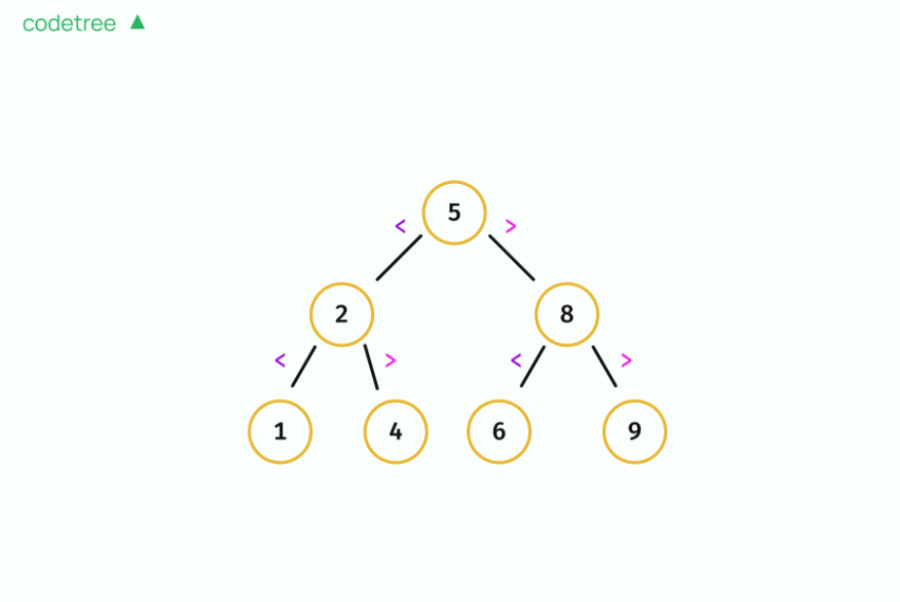
For example, to find the value 6 in a BST with root node 5:
Compare with root (5): 6 > 5, so move to the right subtree.
Compare with node (8): 6 < 8, so move to the left subtree.
Compare with node (6): 6 == 6, found the value.
At each step, the search range is halved. If the tree is balanced, the height h is about log2n, so searches are very fast.
Step 6. How to Search for a Value in a Binary Search Tree
Idea
Since BSTs are sorted, searching for a value is very efficient. By leveraging the rule left child < parent node < right child, you can narrow the search range step by step, similar to binary search.
Logic Breakdown
Here’s how BST search works:
If the current node is None, the value is not in the tree.
If the target == current node value, return the node.
If the target < current node, move to the left child.
If the target > current node, move to the right child.
Repeat steps 1–4 until the value is found or the node becomes
None.
Here’s the Python implementation:
Code Implementation
# Definition for a binary tree node.
# class TreeNode(object):
#     def __init__(self, val=0, left=None, right=None):
#         self.val = val
#         self.left = left
#         self.right = right
class Solution(object):

    def codetree_sol(self, node, target):
        if node is None:
            return None
        if target == node.val:
            return node
        elif target < node.val:
            return self.codetree_sol(node.left, target)
        else:
            return self.codetree_sol(node.right, target)

    def searchBST(self, root, val):
        """
        :type root: Optional[TreeNode]
        :type val: int
        :rtype: Optional[TreeNode]
        """
        return self.codetree_sol(root, val)
Frequently Asked Questions
Q. What algorithmic concepts can you learn from this problem?
BST structure, recursive/iterative implementation, time complexity analysis, tree traversal
Q. How do you handle duplicate values in a tree?
To handle duplicates, adjust the BST rule:
left < root < right
to either
left ≤ root < right
or
left < root ≤ right
This allows for duplicate values on one side.
How to Prepare for Interviews with the "Binary Search Tree" Problem
The ‘Search in a Binary Search Tree’ problem is a learning example for understanding BST search principles. While it’s not frequently asked directly in interviews, it’s recommended for understanding how internal libraries and data structures work.
This helps you improve:
Understanding the properties of Binary Tree and BST data structures
Clearly grasping the process of moving to left or right subtrees based on conditions during search
Time complexity analysis, revisiting the O(log N) search property of BSTs
Similar Problems to Practice
These problems are also useful for learning the structural properties and search rules of BSTs. In real interviews, you’re more likely to be asked about how libraries work or the trade-offs between data structures, rather than being asked to implement them from scratch.
How to Review After Solving
Implement tree traversal methods:
Try implementing preorder, inorder, and postorder traversals to reinforce your understanding of BSTs.
This experience helps you understand library structures.
Summarize the core logic:
Be able to answer interview questions like “Why is search fast in a BST?” by summarizing the search logic in one sentence.
Compare condition changes:
By seeing how ‘BST conditions’ change in other problems, you can deepen your understanding of tree structures.
💡Coding Interview Prep Guide
What you must know for real interviews:
➤ TreeSet and TreeMap internally use Balanced Binary Search Tree structures (e.g., Red-Black Tree)
➤ Why BSTs are useful for maintaining sorted order, and how they differ from hash tablesWhat you should be able to explain:
“How does branching to left and right subtrees in a BST reduce the search range?”
“Why is maintaining tree balance important, and what should you consider during insert/delete?”
Data structures are the foundation of algorithm understanding:
This knowledge is more often tested in technical interviews than in coding tests, especially when asked about how libraries and data structures work.
Codetree provides a guided learning path for tackling these classic problems, starting with the basics and building up to real interview-level challenges with expert feedback. By following this approach, you’ll not only solve the problem—you’ll truly understand the “why” behind the solution and be ready for anything your next interview throws at you.
Comments 0
0/2000
More articles

Interview Problem Explained: Guess Number Higher or Lower II(LeetCode 375, Minimax & Dynamic Programming)

Interview Problem Explained: Guess Number Higher or Lower (LeetCode 374, Binary Search)

Interview Problem Explained: To Lower Case (LeetCode 709, String Manipulation & ASCII Code)

Interview Problem Explained: Fibonacci Number (LeetCode 509, DP & Memoization)
Coding Interview Prep
- Interview Problem Explained: Kth Largest Element in a Stream (Heap Technique)

- Interview Problem Explained: Search in a Binary Search Tree (BST)
- Interview Problem Explained: Fruit Into Baskets (Two Pointer Technique)
- 7 Best Coding Test Sites to Ace Your coding Interviews (2025 Ver.)